
This article expands on my LinkedIn post. Follow me there for shorter, day-to-day notes.
Every developer knows the routine. Open Jira. Read the issue. Copy the description. Paste it into an AI tool. Explain the codebase. Copy the code back. Run tests. Go back to Jira. Write a comment. Move the ticket. Repeat for the next issue.
The AI part is fast. Everything around it is manual.
I've been exploring a workflow that removes most of that glue work by connecting the pieces directly:
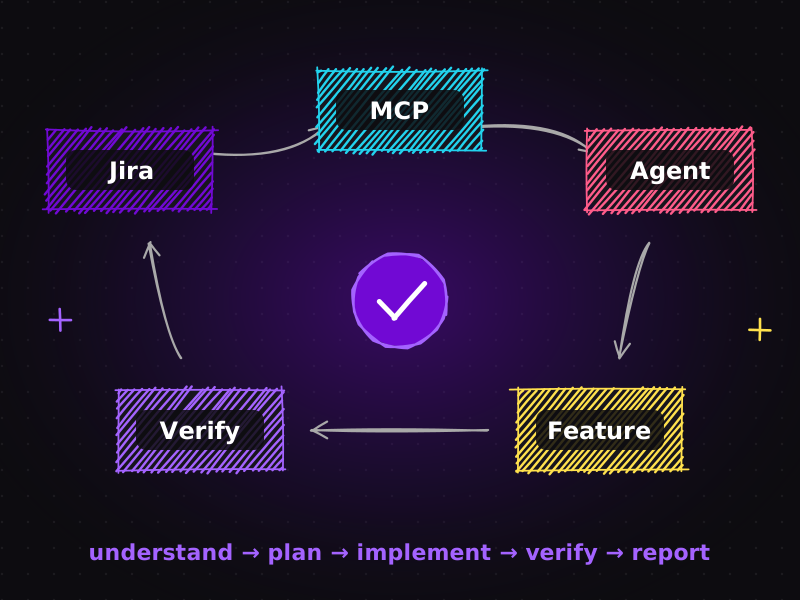
Jira → Atlassian MCP → AI Agent → Feature Development → Verification → Jira
Instead of manually copying requirements into an AI coding tool, the agent reads the Jira issue itself, understands the requirements, explores the codebase, plans the work, implements it and runs verification. The result is then connected back to Jira, creating a traceable development loop.
This article walks through how that loop works, what you need to set it up, where the real value lies, and where humans must stay firmly in control.
The problem: AI is fast, but the handoffs are slow
AI coding agents have made writing code dramatically faster. But in many teams, the overall delivery time barely moved. Why? Because code was never the only bottleneck. The rest of the work is coordination:
- translating a ticket into instructions the AI understands,
- re-explaining project context every session,
- copying results between tools,
- updating tickets so the team knows what happened,
- chasing the status of work across people and systems.
These handoffs are small individually, but they add up, and every one of them is a chance for information to get lost.
What is the Atlassian MCP server?
MCP (Model Context Protocol) is an open standard that lets AI applications connect to external tools and data sources through a common interface. Instead of every AI tool building a custom integration for every service, a service exposes an MCP server, and any MCP-compatible AI client can use it.
Atlassian provides an MCP server for its cloud products, including Jira and Confluence. Once connected, an AI agent can do things like this, within the permissions you grant:
- search and read Jira issues, including descriptions, acceptance criteria and comments,
- read linked Confluence pages for specifications or technical documentation,
- add comments to an issue with a summary of work done,
- update fields or transition the issue to a new status.
In other words, the agent can work with your project tracker directly, rather than relying on whatever you remembered to paste into the chat. If agents, tools and MCP are new concepts for you, start with my plain-English guide to AI agents, sub-agents and tools.
The workflow, step by step
Here's how the loop works in practice with a coding agent such as Claude Code.
Step 1: The agent reads the Jira issue
You give the agent an issue key, for example "work on WEB-142". Through MCP, it fetches the issue: summary, description, acceptance criteria, linked pages and recent comments. No copying, no paraphrasing, no lost details.
Step 2: It understands the requirements
The agent restates the requirements in its own words and flags anything ambiguous: "The issue says 'show discount on cart'. Should it also appear on the mini-cart?" This is the first human checkpoint: clarify now, not after the code is written.
Step 3: It explores the codebase
Using its file and search tools, the agent finds where the change belongs: relevant templates, components, services and existing tests. Persistent project instructions (a CLAUDE.md file) tell it the architecture and conventions it must follow.
Step 4: It plans the work
Before touching code, the agent writes a plan: which files change, what new tests are needed, any risks. You review and approve the plan. This is the second human checkpoint, and the cheapest place to change direction.
Step 5: It implements the feature
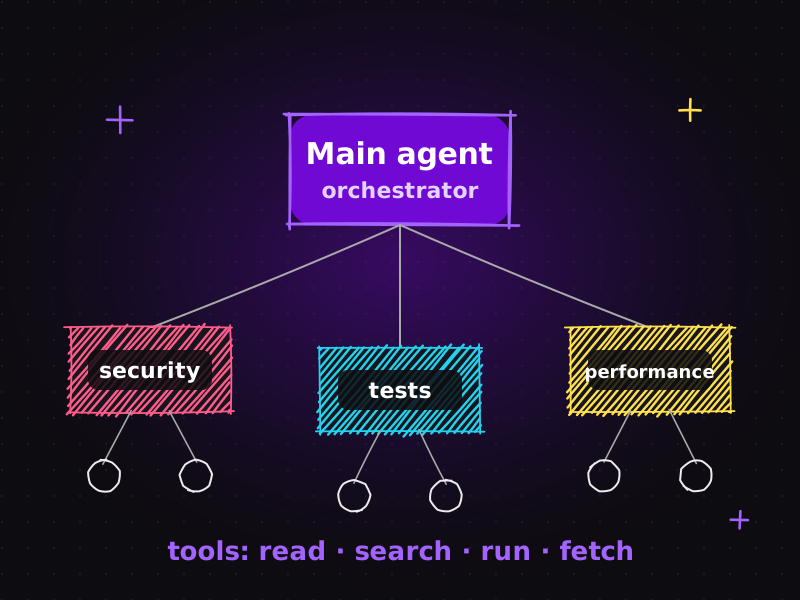
The agent implements the plan on a dedicated branch, or in a separate Git worktree so it can't interfere with other work in progress. Specialist sub-agents can handle parts of the job, such as writing tests or reviewing security.
Step 6: It runs verification
The agent runs the test suite, linter, type checks and build. For web projects, browser tests can walk through the real user journey. Nothing moves forward while anything is red. (My favourite plugins for this stage are in Claude Code plugins: turn one AI assistant into an AI engineering team.)
Step 7: It reports back to Jira
Finally, the agent posts a structured comment on the Jira issue: what changed, which files, which tests were added, verification results, and anything that needs human attention. Depending on your rules, it can also move the issue on, for example to In Review.
The loop closes where it started: in Jira, where the rest of the team already looks.
What a good agent report in Jira looks like
The final report is what makes the loop useful to the rest of the team, so it's worth standardising. A good agent comment on a Jira issue includes:
| Summary | One or two sentences on what was done, in plain language. |
|---|---|
| Changes | The branch name and the main files changed. |
| Tests | Which tests were added or updated. |
| Verification | Results of the test suite, linting, type checks, build and any browser tests. |
| Decisions and assumptions | Anything the agent had to interpret, so a human can confirm it. |
| Open questions or follow-ups | Anything that needs a person, such as copywriting, design sign-off or a related bug found along the way. |
For example: "Added a free-shipping progress message to the cart and mini-cart (branch WEB-142-free-shipping). Two unit tests and one browser test added. All tests, lint and build pass. Assumption: threshold read from existing shipping settings rather than hard-coded. Follow-up: the message text needs marketing approval."
A reviewer can read that in thirty seconds and know exactly where to look.
Common pitfalls when connecting Jira to AI agents
| Poorly written tickets | An agent can only be as clear as the issue it reads. Tickets with real acceptance criteria produce dramatically better results. |
|---|---|
| Too much access | Giving an agent every project and full edit rights is unnecessary and risky. Scope access to what the task needs. |
| Skipping the plan review | Letting an agent go straight from ticket to code removes the cheapest checkpoint in the whole process. |
| Noisy comments | Overly long agent reports get ignored. Keep a consistent, short format. |
| No connection to Git | The traceability story falls apart if commits and branches don't reference the issue key. Make it a rule in your project instructions. |
The real advantage isn't just faster coding
Yes, the feature gets built faster. But the bigger win is what disappears from your day:
| Less context switching | You stay in one place while the agent moves between Jira, the codebase and the terminal. |
|---|---|
| Less repetitive coordination | No more re-typing requirements or status updates. |
| Fewer manual handoffs | Information flows directly from ticket to agent to code and back. |
| Lower development overhead | Small tickets that used to take an hour of admin around ten minutes of coding become genuinely small. |
And because every step is recorded (the plan, the branch, the commits, the verification results and the Jira comment), the whole process is traceable. Anyone can see what was asked, what was done and how it was checked.
Make it more powerful with the right foundations
This workflow becomes much more capable when combined with a few supporting practices:
| Persistent project context | A CLAUDE.md file with architecture, conventions and testing commands means the agent starts every ticket already knowing your project. |
|---|---|
| Specialised agents | Separate sub-agents for testing, code review and security produce better results than one agent doing everything. |
| Git worktrees | Isolated working copies let several tickets progress at once without conflicts. It's the same idea behind running multiple Claude projects in parallel. |
| Automated verification | Tests, linting, type checks and builds act as an objective gate before any human review. |
Where humans stay in control
The goal isn't to let AI make every decision. The goal is to give AI a structured environment where it can:
Understand → Plan → Implement → Test → Verify → Report
while humans remain responsible for architecture, decisions and quality. In my setup, that means:
- Humans write or approve the requirements. The ticket is the source of truth, and ambiguities go back to a person.
- Humans approve plans before significant changes.
- Humans review the code and the behaviour before merging.
- Agent permissions are limited. For example, an agent can comment and move tickets to In Review, but not to Done, and it never deploys to production on its own.
- Sensitive data stays protected. Only the projects and spaces the agent needs are accessible.
These guardrails are what make the workflow trustworthy rather than risky.
Is this the next step, or unnecessary complexity?
When I shared this workflow on LinkedIn, I asked exactly that question. My honest answer: it depends on the size of the problem you're solving.
For a single small website with a handful of changes per month, connecting Jira, MCP and agents may be more setup than it's worth. A simple spec and a careful AI-assisted session is enough.
For teams, freelancers and agencies handling a steady stream of tickets across several projects, the coordination overhead is real, and removing it pays off quickly. The traceability alone is valuable for clients who want to see exactly what was done and how it was verified.
The key is to add structure where it removes friction, not where it adds ceremony.
How to get started
If you want to try this yourself, start small:
- Connect one project. Set up the Atlassian MCP server with access to a single Jira project.
- Write a CLAUDE.md for the matching repository: architecture, conventions, test commands.
- Pick low-risk tickets: small bugs, copy changes, minor UI tweaks.
- Keep the human checkpoints: requirements clarification, plan approval, code review.
- Standardise the Jira comment format so reports are consistent and easy to scan.
- Expand gradually as you gain confidence, adding more ticket types, sub-agents and worktrees.
What this means for my clients
I use these AI engineering practices to deliver website development, technical SEO and UI/UX work faster and with clearer reporting. Whether you track work in Jira, a shared document or a simple email thread, the principle is the same: clear requirements in, verified and documented work out. You can learn more about my background and certifications on my about page, or read about the learning journey behind this in from AI-assisted coding to AI engineering.
Frequently asked questions
Can an AI agent read Jira issues directly?
Yes. Using the Atlassian MCP server, an MCP-compatible AI agent can search and read Jira issues, including descriptions, acceptance criteria and comments, and with the right permissions it can also add comments and update issue status.
What is the Model Context Protocol (MCP)?
MCP is an open standard for connecting AI applications to external tools and data. A service exposes an MCP server, and any compatible AI client can use it, so agents can work with systems like Jira, Confluence, databases or design tools without custom integrations.
Is it safe to let an AI agent update Jira?
It can be, with guardrails. Limit the agent to the projects it needs, allow comments and transitions only up to a review status, keep humans approving plans and code, and never let the agent deploy to production on its own.
What are the main benefits of a Jira to AI agent workflow?
Less context switching, less repetitive coordination, fewer manual handoffs and lower development overhead, plus a traceable record of what was requested, what changed and how it was verified.
Is this workflow worth it for small projects?
For a single small website, a simple specification and a careful AI-assisted session is usually enough. The Jira and MCP loop pays off when you handle a steady stream of tickets across one or more projects.
Want reliable, well-documented delivery on your next website or SEO project? Get in touch or view my pricing.

Muhammad Faisal
WordPress developer & SEO expert with 8+ years of experience, now building AI-assisted development workflows with Claude Code, MCP and coding agents. More about me.